A gentle tap on the wrist when you snore.
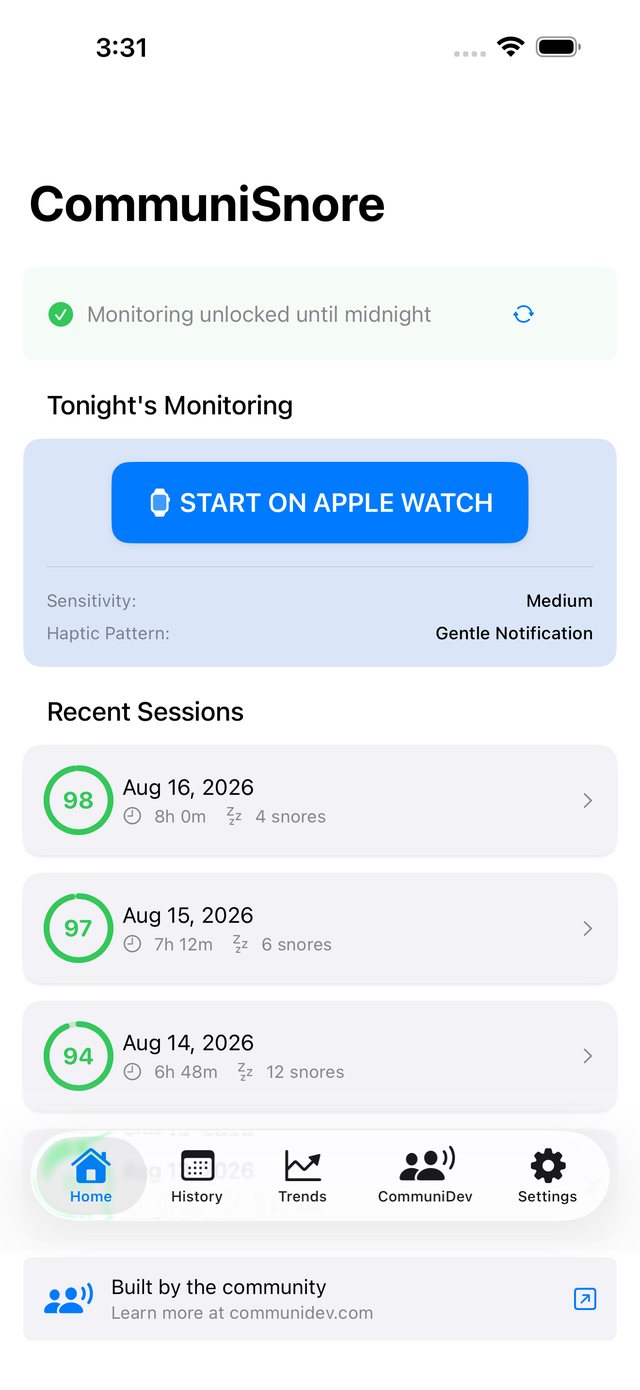
CommuniSnore runs on your Apple Watch through the night and logs every snore. In the morning, your iPhone shows how the night went.
Free · iOS 17+ · Health & Fitness
- Free forever
- Every feature included
- Haptic nudges
- iPhone + Apple Watch

How a night works
Four steps, from bedtime to breakfast
The Watch app is where the work happens. The iPhone is where you read the results.
-
1Evening
Start the night
Open CommuniSnore on iPhone and watch one short ad to start tonight’s monitoring. That’s the whole business model.
-
2Bedtime
Start on the Watch
Tap Start Sleep Monitoring on your paired Apple Watch and put it on.
-
3Overnight
Sleep
When you snore, the Watch taps your wrist. It makes no sound, and the screen stays dark.
-
4Morning
Read the morning report
See your quiet score, a timeline of the night, and how it compares with the weeks before.
What it does
A quiet sleep companion on your wrist
CommuniSnore listens through the night and answers snoring with a gentle haptic nudge on your wrist. The nudge encourages a small change of position instead of waking you up.
Detects snoring on the Watch
Apple’s Sound Analysis framework classifies audio in real time, right on the Watch.
Nudges without waking you
A haptic pattern you choose taps your wrist when snoring is detected. It’s enough to shift position, not enough to wake you.
Logs every night
Timestamped events, a quiet score, and week‑over‑week trends, so you can see your patterns.
Syncs to Apple Health
Sleep sessions go to HealthKit only if you grant access, so they sit with the rest of your health data.
Lasts the whole night
A typical 8‑hour session stays under 40% Watch battery drain, with the screen off and monitoring the whole time.
Tune it to you
Set the sensitivity and the haptic pattern yourself, from barely there to unmistakable.

On the wrist
Start it, then forget it
One tap starts the session. The app keeps a workout session running, so monitoring continues all night with the screen off.
In the morning, the Watch hands the session to your iPhone: elapsed time, snore count, and every haptic it sent.
A look inside
Readable at 3 a.m.
Every screen is designed for a sleepy glance.


Wellness, not medical
CommuniSnore is a wellness tracking tool. It does not diagnose sleep apnea, snoring disorders, or any medical condition, and the haptic alerts are not a treatment. If you suspect a sleep disorder, please consult a qualified healthcare provider.
Nights, gently nudged and tracked
Free for everyone, with every feature included. It stays that way.
Free, no subscription.
What you need
- iPhoneiOS 17 or later
- Apple WatchSeries 4 or later, watchOS 10+
- PermissionsWatch microphone; Health optional
- CostFree, ad supported